

Implementing CQRS (Command Query Responsibility Segregation) in PHP
Command Query Responsibility Segregation (CQRS) is an architectural pattern that separates the read and write operations of a system, allowing for more scalable and maintainable applications. This pattern can be particularly beneficial in complex PHP applications where performance and flexibility are crucial. In this blog, we’ll explore the principles of CQRS, its benefits, and how to implement it in PHP.
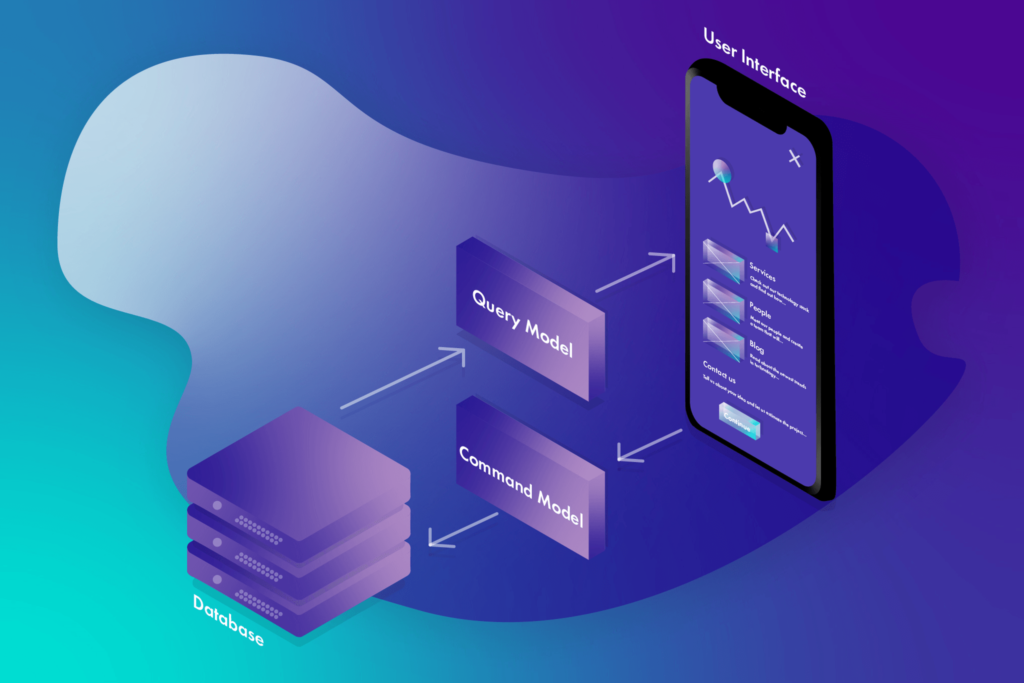
Understanding CQRS
What is CQRS?
CQRS stands for Command Query Responsibility Segregation. It’s an architectural pattern that divides the operations of a system into two distinct categories:
- Commands: These are operations that change the state of the system. Commands are responsible for creating, updating, or deleting data.
- Queries: These are operations that retrieve data without modifying the state of the system. Queries are responsible for reading and displaying data.
Benefits of CQRS
- Scalability: Separating reads and writes can help scale each part independently, optimizing performance.
- Maintainability: With a clear separation of concerns, the codebase becomes more manageable and easier to understand.
- Flexibility: CQRS allows for more flexible and tailored data models for reading and writing, improving performance and usability.
Implementing CQRS in PHP
Step 1: Setting Up the Project
First, set up a new PHP project. If you don’t already have Composer installed, install it from getcomposer.org.
Step 2: Define the Domain Model
Create a basic domain model to represent the data. For this example, let’s assume we’re building a simple user management system.
// src/Domain/User.php namespace App\Domain; class User { private string $id; private string $name; private string $email; public function __construct(string $id, string $name, string $email) { $this->id = $id; $this->name = $name; $this->email = $email; } // Getters and setters... }
Step 3: Implement Commands
Commands are responsible for changing the state of the system. We’ll create a command to add a new user.
// src/Command/AddUserCommand.php namespace App\Command; class AddUserCommand { public string $id; public string $name; public string $email; public function __construct(string $id, string $name, string $email) { $this->id = $id; $this->name = $name; $this->email = $email; } }
Next, create a handler for this command.
// src/Handler/AddUserHandler.php namespace App\Handler; use App\Command\AddUserCommand; use App\Repository\UserRepository; class AddUserHandler { private UserRepository $userRepository; public function __construct(UserRepository $userRepository) { $this->userRepository = $userRepository; } public function handle(AddUserCommand $command) { $user = new User($command->id, $command->name, $command->email); $this->userRepository->save($user); } }
Step 4: Implement Queries
Queries are responsible for reading data from the system. Let’s create a query to fetch a user by their ID.
// src/Query/GetUserByIdQuery.php namespace App\Query; class GetUserByIdQuery { public string $id; public function __construct(string $id) { $this->id = $id; } }
And the corresponding handler for the query.
// src/Handler/GetUserByIdHandler.php namespace App\Handler; use App\Query\GetUserByIdQuery; use App\Repository\UserRepository; class GetUserByIdHandler { private UserRepository $userRepository; public function __construct(UserRepository $userRepository) { $this->userRepository = $userRepository; } public function handle(GetUserByIdQuery $query) { return $this->userRepository->findById($query->id); } }
Step 5: Create Repositories
Repositories are used to abstract the data storage logic. We’ll create a simple user repository.
// src/Repository/UserRepository.php namespace App\Repository; use App\Domain\User; class UserRepository { private array $users = []; public function save(User $user) { $this->users[$user->getId()] = $user; } public function findById(string $id): ?User { return $this->users[$id] ?? null; } }
Step 6: Wiring It All Together
To wire everything together, we’ll use a simple service container.
// src/ServiceContainer.php namespace App; use App\Handler\AddUserHandler; use App\Handler\GetUserByIdHandler; use App\Repository\UserRepository; class ServiceContainer { private array $instances = []; public function get($class) { if (!isset($this->instances[$class])) { $this->instances[$class] = $this->createInstance($class); } return $this->instances[$class]; } private function createInstance($class) { switch ($class) { case AddUserHandler::class: return new AddUserHandler($this->get(UserRepository::class)); case GetUserByIdHandler::class: return new GetUserByIdHandler($this->get(UserRepository::class)); case UserRepository::class: return new UserRepository(); default: throw new \Exception("Unknown class: $class"); } } }
Step 7: Using the CQRS Pattern
Finally, use the service container to execute commands and queries.
require 'vendor/autoload.php'; use App\Command\AddUserCommand; use App\Query\GetUserByIdQuery; use App\ServiceContainer; $container = new ServiceContainer(); // Adding a user $addUserHandler = $container->get(AddUserHandler::class); $addUserCommand = new AddUserCommand('1', 'John Doe', 'john@example.com'); $addUserHandler->handle($addUserCommand); // Fetching a user $getUserHandler = $container->get(GetUserByIdHandler::class); $getUserQuery = new GetUserByIdQuery('1'); $user = $getUserHandler->handle($getUserQuery); echo $user->getName(); // Outputs: John Doe
Conclusion
Implementing CQRS in PHP can greatly enhance the scalability and maintainability of your applications. By separating the read and write operations, you can optimize each part independently, making your system more efficient and easier to manage. While this example is simple, the principles can be extended to more complex applications, providing a robust architecture for modern PHP development.